

Bespoke Business Applications Workflow Automation

Business software configured around the way you work

Turn your forms, spreadsheets and approval flows into a connected business application. Mobbiz configures workflows, data, permissions, portals and reporting around your operation, with web and mobile access and integrations where needed

Bespoke solutions for the processes that
make your business different

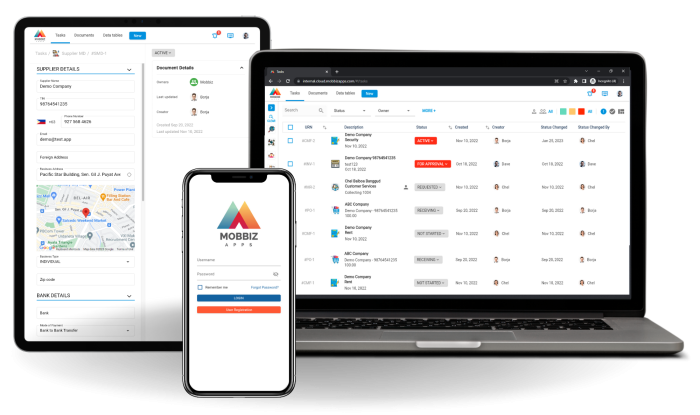
Mobbiz is a no-code business process management (BPM) and workflow automation platform. Our Business Analysts configure applications around your business processes, including the information you collect, who can access it, which decisions require approval and how work moves between teams.

Start with a priority workflow or connect several departments in one solution. Mobbiz can manage operational records directly or work alongside your ERP, CRM and accounting systems. Each project defines what is delivered through configuration, what needs integration and which requirements would need additional development.

Introduction

What bespoke means at mobbiz

A bespoke business application is software tailored to an organisation’s particular processes, data and responsibilities. In Mobbiz, most of that tailoring happens through configuration on an existing cloud platform, rather than writing a separate application from scratch.

Your solution can have its own forms, approval routes, business rules, documents, dashboards and stakeholder portals. Operational governance makes these controls part of daily work: it defines who does what, which information is required and what must happen before a record can move forward.

standard software

When standard software leaves work
outside the system

Consider a bespoke solution when:

Your team maintains spreadsheets to cover steps your current systems do not support.

Requests move between departments through email, chat and repeated follow-ups.

Different sites or business units need different approval rules within a common process.

Field teams capture information on paper and enter it again at the office.

Customers, suppliers or contractors need to submit information without accessing internal systems.

Managers cannot see pending work, missing evidence or the reason for a delay.

Business process coverage

Business processes we can configure
around your operation

The scope below illustrates possible applications. Your solution includes the processes and integrations
agreed during scoping.

Process area Example business processes What the solution controls
Requests and approvals Internal requests, spending approvals, exception requests Required information, approval limits and decision history
Field operations Inspections, technical surveys, site visits, certifications Checklists, photo evidence, location, review and generated reports
Service and case management Service requests, incident handling, customer complaints Ownership, deadlines, supporting documents and resolution
Projects and service delivery Client onboarding, contract milestones, handovers Responsibilities, dependencies, deliverables and acceptance
Quality and compliance Audits, findings, corrective actions, document reviews Evidence requirements, review steps and closure approval
Commercial and back-office operations Quotations, orders, procurement, expenses, invoice workflows Connected records, approval rules and departmental handoffs
External collaboration Supplier, customer, franchisee and partner submissions Branded access, permitted records and internal review

Example Governed Workflows

Workflow 01

Inspection to approved report

  1. 1Schedule the inspection
  2. 2Capture findings on mobile
  3. 3Attach photos and signatures
  4. 4Route technical review
  5. 5Generate the approved PDF report

Configure checklists and review levels for the asset, client or project. Field teams can capture information offline and synchronise when connectivity returns.
Workflow 02

Customer request to completed service

  1. 1Receive the request through a form or portal
  2. 2Assign an owner
  3. 3Review scope and approvals
  4. 4Track delivery milestones
  5. 5Confirm completion and retain the service history

Link the customer, contract, supporting documents and related requests so teams can follow the same case across departments.

Workflow 03

Audit finding to verified corrective action

  1. 1Record the finding
  2. 2Assign the corrective action and deadline
  3. 3Collect evidence
  4. 4Review the response
  5. 5Approve closure or return it for further work

Managers can see overdue actions and the evidence behind each closure.

Workflow 04

Approved request to ERP transaction

  1. 1Capture the request
  2. 2Validate required information
  3. 3Apply approval rules
  4. 4Resolve exceptions
  5. 5Send approved data to the connected system

The integration defines the records exchanged, trigger points and returned statuses. It is scoped around the capabilities of each system.

What can be tailored to your business

01

Forms and connected data

Configure fields, validations, calculations and master data. Link records across business processes so a customer, asset, order or project can be followed through related work.

02

Approval routes and business rules

Route decisions by amount, department, site or other agreed conditions. Configure parallel reviews, required evidence and the actions available at each stage.

03

Roles and permissions

Control access by role and record, with fields hidden, read-only, editable or required at different workflow stages. Teams work on the same process with access appropriate to their responsibilities.

04

Mobile work and external portals

Use web, iOS and Android applications for the configured processes. Capture field data offline, including photos, geolocation and signatures. Give external stakeholders their own portal or public submission form where appropriate.

05

Documents and operational visibility

Generate branded PDFs from process data. Monitor workload, deadlines and exceptions through dashboards, filtered views, email notifications and in-app alerts. Retain the history of changes and decisions.

How Mobbiz fits with your existing systems

Mobbiz can provide the application for a defined operational scope or connect workflows around existing systems. For example, an ERP can retain the financial record while Mobbiz coordinates the request, evidence and approvals before posting.

APIs, webhooks, configured plugins and CSV imports or exports support data exchange. Integration feasibility depends on system access, available interfaces, data quality and security requirements. At Decathlon Philippines, Mobbiz connected configured procurement and B2B sales processes with Oracle.

Three ways to deliver your application

Approach When it can fit What to assess
01 Configure Mobbiz
The requirement centres on forms, records, approvals, field work and connected processes Fit with platform capabilities, implementation scope and recurring licences
02 Extend an existing ERP or CRM
The required workflow fits the suite and its available modules Configuration options, upgrade implications and participation across departments
03 Develop a standalone application
The requirement needs capabilities or a user experience beyond the platform Development effort, testing, hosting and long-term maintenance
01

AI document extraction within your workflow

The available Image Recognition agent reads uploaded PDFs, including scanned PDFs, and populates mapped form fields. An invoice workflow, for example, can extract the supplier, invoice number, date and amounts before a reviewer checks the record.

The agent’s inputs, instructions, trigger stage and output fields are configured for the use case. Field validation and business rules apply to extracted values, with human review before the workflow advances as designed.

Text Composer, Compliance Check and Convert Attachments to Markdown are in development. Their availability and suitability must be confirmed during scoping. AI configuration and usage are defined in the commercial proposal.

02

Security and control across the configured solution

Mobbiz runs as cloud software on Amazon Web Services, with a separate database for each client, encryption at rest and in transit, configurable access controls and audit logs. Available hosting regions include Singapore and Ireland; the region for your solution is confirmed during scoping.

Data location, retention, backup arrangements and contractual data-protection requirements are reviewed for the project. Security documentation is available for due diligence. Workflow controls support your organisation’s policies and compliance processes; legal compliance also depends on how the solution is configured and used.

How we deliver your bespoke solution

01

Map your process.

Review the current forms, spreadsheets, roles, approval rules and systems. Identify the priority problem and the outcome to measure.

02

Define the solution and scope.

Agree the business processes, master data, relationships, integrations and acceptance criteria. Identify any capability that needs a separate build.

03

Configure and validate.

Set up the solution, review it with process owners and test real scenarios, including exceptions and access permissions.

04

Train and launch.

Complete user acceptance testing, prepare users and introduce the solution in the agreed phases.

05

Adapt as requirements change.

Authorised configuration changes can adjust forms, rules and approvals. Larger changes and new integrations are assessed for effort and impact.

Bespoke applications in practice

CASE STUDY 01

IDOM in the Philippines

Mobbiz was configured for more than 3,000 building and bridge inspection surveys, with mobile capture, six levels of review, signatures and PDF reporting.

~80% Faster approvals
3–3.5 hrs Saved per survey

Mobbiz reports these results.

CASE STUDY 02

Abantos in wind energy

Mobbiz connected contracts, inspections and certification around turbine-manufacturer requirements, including offline field capture and certificate generation.

~95% Fewer data entry errors
75% Fewer report corrections

Mobbiz reports these results.

CASE STUDY 03

El Urogallo in Spain

Mobbiz supported more than 20 processes across restaurant outlets, including assessments, inventory, maintenance and preparation checklists.

~80% Less report consolidation work
60% Fewer process errors

Mobbiz reports these results.

i

Results are reported in Mobbiz’s December 2025 use case summary. They relate to individual implementations and are not a forecast or guarantee for another project.

Frequently Asked Questions

Is Mobbiz bespoke software or a no-code platform?

Both describe the offering. Mobbiz is a no-code platform, and the solution is tailored to your processes through configuration. Integrations and capabilities outside the existing platform are assessed separately.

A standard module provides a starting set of business processes for a function or industry. A bespoke solution adapts or combines those processes, or configures new ones, around requirements specific to your organisation.

Yes, where the requirement fits the platform. We map the spreadsheet’s records, calculations, approvals and reports into structured processes. Data cleansing and migration are included in the project assessment.

Yes. Mobbiz can manage the surrounding workflows and exchange data with those systems through an agreed integration. It can also manage selected operational records directly.

Authorised Business Analysts or process owners can change configuration within their access rights and training. New integrations, major redesigns and new product capabilities require further assessment.

Yes. Native iOS and Android apps support offline data capture and synchronisation when connectivity returns. The project defines which field activities need to work offline and validates them in testing.

Yes. Portals provide external users with controlled access to the relevant records and actions. Public forms can collect submissions without a login. Access design and external-user pricing are agreed in the scope.

Timing and cost depend on the number and complexity of processes, integrations, data migration and rollout. The proposal separates one-time implementation from recurring licences and any applicable external access, AI usage or integration charges. See Pricing for current reference tiers.

You own your business data. Mobbiz provides a configured solution on its proprietary SaaS platform; this is not a transfer of the platform’s source code. Data export and exit arrangements are defined in the agreement.

The current offering is cloud SaaS. If your project requires on-premise deployment or a specific data location, raise that requirement at the outset so the team can assess fit.

Yes. Mobbiz has client implementations in Spain and the Philippines and serves organisations across Southeast Asia. The platform is available in English and Spanish. During discovery we agree the operating locations, hosting requirements and systems involved.

See how your process could work in Mobbiz

Share a real workflow, form or spreadsheet with us. We will map the main steps, show how Mobbiz can support them and identify the configuration, integrations and investment required.